Tutorial · Test Automation
Testing APIs Protected by Microsoft Entra ID with REST-Assured
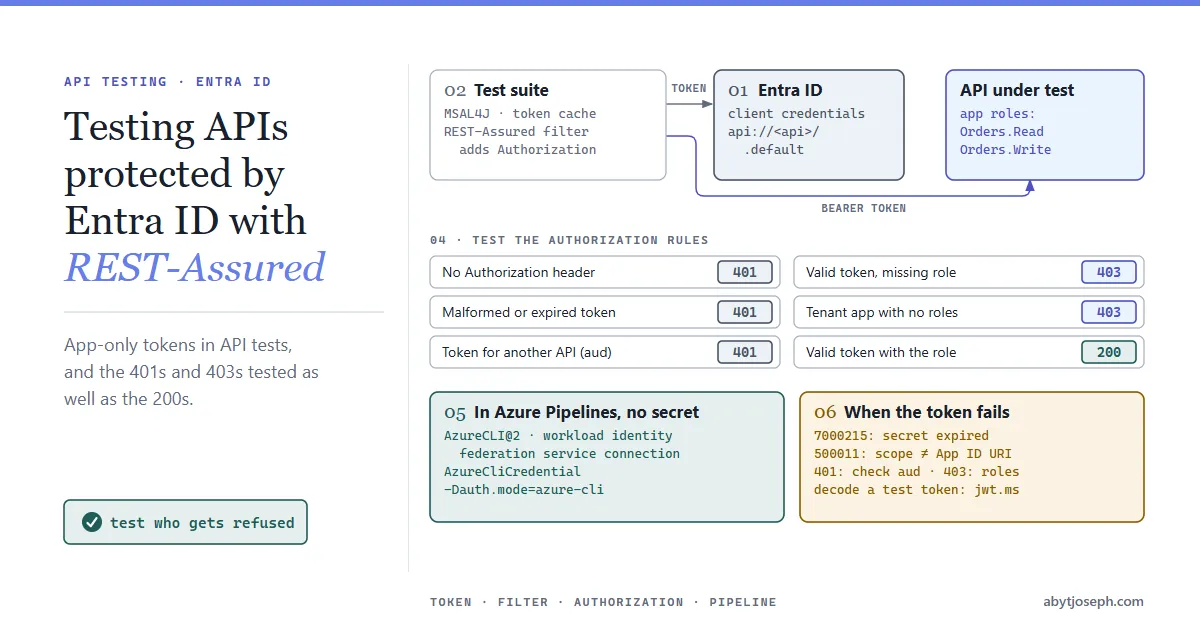
Get Microsoft Entra ID access tokens in REST-Assured API tests with the client credentials flow, test authorization as well as functionality, and run it all in Azure Pipelines without storing a secret.
In this article6 sections
Most internal APIs in an Azure shop sit behind Microsoft Entra ID (formerly Azure AD). That’s good for security and awkward for test automation. Before the first assertion can run, the test has to get a valid access token for the right API with the right permissions, and keep getting one for the whole run.
In this article we will set up a test client in Entra ID, get tokens in Java with MSAL, plug them into REST-Assured, test the authorization rules as well as the happy path, and run the suite in Azure Pipelines without a client secret.
If service principals and bearer tokens are new to you, start with Authentication for Azure REST APIs using Azure AD Service Principals. This article builds on the same ideas.
How app-only authentication works
API tests don’t have a user sitting at a browser, so they authenticate as an application, using the OAuth 2.0 client credentials flow:

Two app registrations are involved. The API has one that defines app roles, such as Orders.Read and Orders.Write, with Allowed member types set to Applications so they can be granted to other apps. If the API has no Application ID URI yet, set one under Expose an API (the default suggestion is api://<api-app-id>).
The test client is a second app registration, used only by the tests. Under API permissions >> Add a permission >> My APIs, pick the API (My APIs only lists APIs you own; otherwise look under APIs my organization uses, or ask to be added as an owner), choose Application permissions, tick the roles the tests need, and get an admin to select Grant admin consent.
The test client then asks for a token with the scope api://<api-app-id>/.default. For the client credentials flow, the scope is the API’s Application ID URI with /.default on the end. You don’t list individual permissions; the token gets every app role the client has been granted, in its roles claim.
Get a token with MSAL4J
Add a current version of the Microsoft Authentication Library for Java (com.microsoft.azure:msal4j) to the test project and wrap it in a small token provider (imports from com.microsoft.aad.msal4j, java.net and java.util left out):
public final class TokenProvider {

    private static final Set<String> SCOPES = Set.of(
            Objects.requireNonNull(System.getenv("API_SCOPE"), "API_SCOPE not set")); // api://<api-app-id>/.default
    private static ConfidentialClientApplication app;

    private TokenProvider() {}

    private static synchronized ConfidentialClientApplication app() throws MalformedURLException {
        if (app == null) {
            app = ConfidentialClientApplication.builder(
                        System.getenv("TEST_CLIENT_ID"),
                        ClientCredentialFactory.createFromSecret(System.getenv("TEST_CLIENT_SECRET")))
                    .authority("https://login.microsoftonline.com/" + System.getenv("TENANT_ID") + "/")
                    .build();
        }
        return app;
    }

    public static String accessToken() {
        try {
            return app().acquireToken(ClientCredentialParameters.builder(SCOPES).build())
                        .get()
                        .accessToken();
        } catch (Exception e) {
            throw new IllegalStateException("Could not get an access token for " + SCOPES, e);
        }
    }
}
Keep one ConfidentialClientApplication for the whole run. For the client credentials flow, MSAL checks its in-memory token cache before calling Entra ID, so calling accessToken() before every request is cheap. It only goes back to Entra ID when the cached token is close to expiring, which also means long runs never fail halfway with an expired token.
The client secret and IDs come from environment variables. In the pipeline, those come from Azure Key Vault, never from a properties file in the repo.
Plug it into REST-Assured
A REST-Assured filter adds the header to every request, so individual tests don’t deal with tokens at all. The -Dauth.mode switch picks the token provider; the Azure CLI one is shown further down:
public class EntraTokenFilter implements Filter {

    @Override
    public Response filter(FilterableRequestSpecification request,
                           FilterableResponseSpecification response,
                           FilterContext context) {
        if (!request.getHeaders().hasHeaderWithName("Authorization")) {
            String token = "azure-cli".equals(System.getProperty("auth.mode"))
                    ? AzureCliTokenProvider.accessToken()
                    : TokenProvider.accessToken();
            request.header("Authorization", "Bearer " + token);
        }
        return context.next(request, response);
    }
}
Register it once, for example in a base test class or a JUnit extension:
RestAssured.baseURI = System.getenv("API_BASE_URL");
RestAssured.filters(new EntraTokenFilter());
The hasHeaderWithName check means a test can still send its own Authorization header, which the negative tests below need. For the no-header case, opt out of the filter with given().noFiltersOfType(EntraTokenFilter.class). (given().noFilters() works too, but it also removes any other global filters, such as logging.)
Test the authorization rules, not just the happy path
If every test runs with a token that has every role, all you’ve proved is that the API works for an all-powerful client. The access rules are behaviour too, and they regress just as quietly. Someone adds an endpoint and forgets the role check, or a refactor drops an attribute, and nothing fails.
| Request | Expected |
|---|---|
No Authorization header |
401 Unauthorized |
| Malformed or expired token | 401 Unauthorized |
| Valid token for a different API (wrong audience) | 401 Unauthorized |
| Valid token, client without the required role | 403 Forbidden |
| Valid token from a tenant app with no roles at all | 403 Forbidden |
| Valid token, client with the role | 200 OK (or the success code for that endpoint) |
For the 403 case, create a second test client with fewer roles, for example Orders.Read but not Orders.Write. Copy TokenProvider as ReadOnlyTokenProvider, reading READONLY_CLIENT_ID and READONLY_CLIENT_SECRET instead:
@Test
void readOnlyClientCannotCreateOrders() {
    given()
        .header("Authorization", "Bearer " + ReadOnlyTokenProvider.accessToken())
        .contentType(ContentType.JSON)
        .body(newOrder())
    .when()
        .post("/orders")
    .then()
        .statusCode(403);
}
Setting the content type means the API can’t answer 415 Unsupported Media Type before it checks authorization.
The no-roles row matters because, by default, Entra ID issues app-only tokens without a roles claim to any app in the tenant, so the API has to check roles itself. (The API owner can also turn on assignment required to block such tokens.)
A typical example: someone adds a DELETE /orders/{id} endpoint and protects it with authentication but forgets the role check. Every functional test passes, because the main test client has Orders.Write anyway. Only a matching test for the new endpoint, DELETE /orders/{id} with the read-only client, notices: it gets 204 No Content where it expected 403 Forbidden. That’s why each protected endpoint needs its own negative test.
Run it in Azure Pipelines without a secret
A client secret in Key Vault works, but it still expires, and someone still has to remember to rotate it. In Azure Pipelines you can skip the secret altogether: run the tests inside an Azure CLI task that uses a workload identity federation service connection, and have the tests ask the Azure CLI for the token.
- Create the service connection with workload identity federation. Behind it is an app registration or managed identity.
- Grant that identity the API’s app roles. For an app registration, use API permissions and admin consent exactly as for the test client above. A managed identity has no API permissions page, so assign the app roles with Microsoft Graph instead (for example
New-MgServicePrincipalAppRoleAssignmentin PowerShell). Role changes for a managed identity can take a while to apply, so don’t assume the assignment failed if the first run still gets 403. - In the tests, get the token through the Azure CLI’s sign-in with
AzureCliCredentialfrom a currentazure-identitylibrary (getTokenSyncneeds a recentazure-core):
public final class AzureCliTokenProvider {

    private static final TokenCredential CREDENTIAL = new AzureCliCredentialBuilder().build();
    private static AccessToken cached;

    private AzureCliTokenProvider() {}

    public static synchronized String accessToken() {
        if (cached == null || cached.getExpiresAt().isBefore(OffsetDateTime.now().plusMinutes(5))) {
            cached = CREDENTIAL.getTokenSync(new TokenRequestContext().addScopes(System.getenv("API_SCOPE")));
        }
        return cached.getToken();
    }
}- task: AzureCLI@2
displayName: Run API tests
inputs:
azureSubscription: sc-api-tests # workload identity federation
scriptType: pscore
scriptLocation: inlineScript
inlineScript: mvn -B test "-Dauth.mode=azure-cli"
env:
API_SCOPE: api://<api-app-id>/.default
API_BASE_URL: https://orders-api-test.example.comThe Azure CLI task signs in before the script runs, and Maven, as a child process, uses that sign-in. There’s no secret in the pipeline at all, which is the whole point. The quotes around -Dauth.mode=azure-cli matter: pscore runs PowerShell, which otherwise splits the argument at the dot and Maven fails. AzureCliCredential runs an az command for each token, so the small cache above matters more here than with MSAL.
The -Dauth.mode switch in the filter lets the same tests choose between the two token providers, so developers can still run them locally with a secret from Key Vault.
When the token doesn’t work
Most failures come down to a handful of Entra ID error codes, or a token that’s valid but wrong for the API. Paste a test token into jwt.ms to read its claims. It decodes in the browser and is run by Microsoft, but still never paste a production token anywhere.
AADSTS7000215: invalid client secret. The secret is wrong or expired. Secrets have an end date; check it under Certificates & secrets.AADSTS700016: application not found in the directory. The client ID is wrong, or the tenant ID points at a different tenant.AADSTS500011: resource principal not found. The scope doesn’t match the API’s Application ID URI, or the API isn’t registered in this tenant.AADSTS1002012orAADSTS70011: invalid scope. Client credentials need the/.defaultscope, not individual permissions likeOrders.Read.- 401 with a token that looks fine. Check
aud. The API decides whether it gets v1.0 or v2.0 tokens, and the audience format differs: v2.0 tokens always carry the API’s client ID, while v1.0 tokens can carry the Application ID URI. If the API validates one format and receives the other, every call is rejected. - 403, and the
rolesclaim is missing. Admin consent wasn’t granted, or the role was assigned to a group the test client belongs to. Entra ID doesn’t add therolesclaim for a service principal that gets a role only through group membership, so assign the role to the client directly.
Hope that was helpful! :)